A Guide to Project Management Fundamentals

This is a helpful guide to introduce you to project management, and the elements that make up a successful project.
1 What is a project?
A temporary endeavour that has a specific and unique goal, and usually a budget. A project has a defined beginning and an end. The trigger that a project is completed, is when it is handed over to operations.
Reasons for why projects may seem to go on continuously is likely due to not defining what the goal of the project is, and what it is aiming to accomplish.
1.1 The Project Goal
This is a unique result that could be either a product, a service, or another outcome. There are many reasons for why the project goal exists, and should be implemented. A pain point in the current process has likely been identified, and now it is up to the project manager to oversee the solution to this problem.
1.2 The Project Budget
Projects don't simply face monetary constraints, but also resource, time, legal, risk, or operational constraints.
2 What is project management?
The process of applying knowledge, skills, tools, and techniques to achieve objectives. We ask two questions:
2.1 What problem am I trying to solve?
Define exactly what the project is to accomplish to make it a success.
2.2 How am I going to solve this problem?
This can be defined by understanding the:
- Requirements
- Deliverables
- Scope
2.3 What is my plan?
We must identify:
- Work to be done in detail, how long it may take
- Resources needed and their cost
- Scheduling when work should occur
- Process for how things happpen in the project
2.4 How will I know when the project is done?
This is a quantifiable measurable result that clearly states when the project is completed.
2.5 How successful was the project?
Project managers take time to review the project, finding out what went well, what didn't, and what to improve upon in the next project.
3 Skills
Project managers require technical, business expertise, problem-solving, interpersonal, and leadership skills.
4 Waterfall Project Management Lifecycle
This is a five phase strategy utilised in project management.
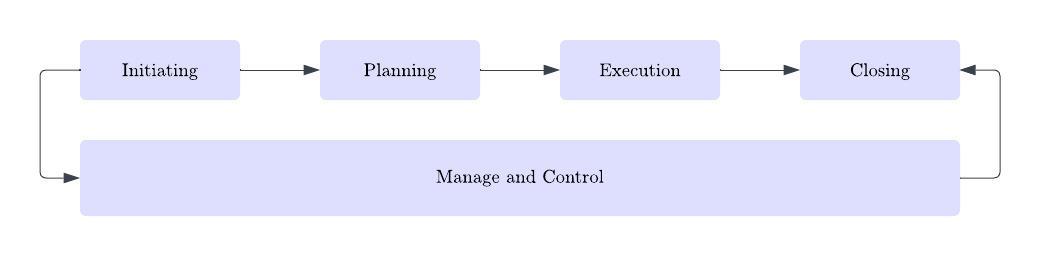
4.1 Initiating
Project managers must consider the definition of the project, the scope, resources needed, and identifying stakeholders, and approval to proceed.
4.2 Planning
A small team of strong team members to determine how to perform the project. This answers the many questions above. Once this is completed, the team requests for approval to launch the project.
4.3 Execution
This is where the team puts the plan into action.
4.4 Manage and Control
To manage the project, first, the project is launched, the team of resources is onboarded, and the rules are outlined for how the project is run. This phase looks into checking into what is being completed, and if this is aligning with the plan. If the project is moving off track, action is taken to bring it back on track.
4.5 Closing
In this phase, the client approves the project, accepting it is complete. The team documents performance, and submits a lessons learned. This signifies the end of the contract whereby resources can be moved onto other assignments.
5 When does project management work?
It works when the project goal and the solution have been clearly defined, scope and deliverables are clear, as the team is aware of what needs to be done. Each stage is completed and iterated upon until completion.
The waterfall approach is simple, and is very low-risk when adequately informed. Teams who have worked on similar projects are able to be more productive as they're familiar with the work and understand how to resolve similar problems.
6 Agile Project Management
Some projects have quite vague solutions with ambiguous processes in building them. Agile project management introduces Sprints wherein certain features are delivered at production quality at regular intervals. Teams in these Sprints are often small, yet incredible specialised allowing them to work largely independently given their experience. This ensures that the client is able to obtain consistent value out of the project as a much faster rate. With the incorporation of a feedback loop, the client can guide the team on features delivered, and next steps to help improve the overall solution.
6.1 Envision
Agile project management starts with envisioning the product and defining a set of initial goals. These goals are likely to change over the course of the Sprint.
6.2 Speculate
In this planning-style phase, the team creates, revises and prioritises the feature list with consideration to business and technical limitations. In this phase, effort estimates are determined, and risks are assessed.
6.3 Explore
In this phase, the team will build and deliver the features outlined in the Sprint.
6.4 Adapt
This phase reviews the results that have been delivered to the client, and lessons learned are documented. Otherwise known as a Retrospective, this review may highlight process changes, or feature rework based on feedback.
By cycling through the above four phases, a Sprint is completed
6.5 Close
When the final Sprint is over and accepted, the project is closed and lessons learned are documented.

7 Hybrid Project Management Lifecycle
This approach takes aspects from both the waterfall and agile methods of project management, wherein:
- The entire project utilises elements of both
- The project is segmented, such that some parts are managed using the waterfall method, and others with the agile method.
7.1 The entire project utilises elements of both
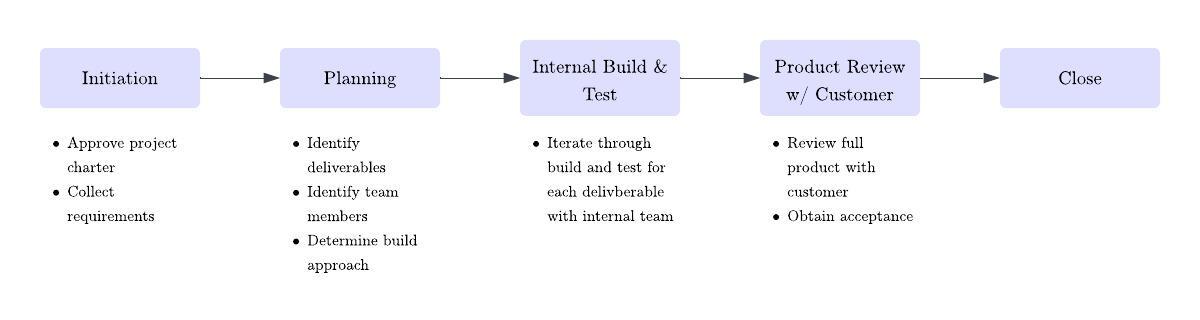
The first hybrid lifecycle integrates both methods, where aspects such as scrum meetings (small, dedicated project team producing documentation and delivering small project features) are applied to the waterfall approach. Teams will often produce their deliverables with agile methods. That being said, project teams will assume the role of the client for individual deliverables, where they assist in providing feedback, and managing the backlog. When utilising this method, the team is able to present everything to actual clients for approval. This process often looks like:
- Drafting and obtaining approval for the project charter
- Collecting requirements
- Planning
- Determining whether the project will consist of one deliverable or many
- Identifying the team required to complete the project, and commitment for their participation
- Determining the build approach (tools, facilities, equiptment, etc.)
- Building and testing
- Teams iterate through building and testing with an internal team, often in a pre-determined sequence if there are multiple deliverables
- Reviewing the completed product with the customer, obtaining acceptance
- Closing
7.2 The project is segmented into waterfall and agile methods
A project that is broken into pieces, with some using the waterfall and others agile, has multiple life cycles. Some project deliverables may be better suited for agile, and others with waterfall. This solution uses a waterfall approach with agile components integrated.
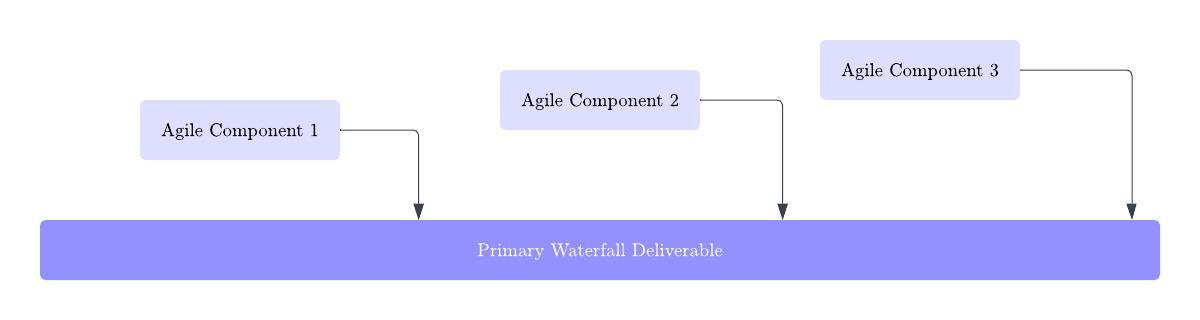
Agile components are created using an agile lifecycle, whereby they are then delivered to the primary waterfall deliverable team, who integrate these components into the overall deliverable. Waterfall is used for the final product, which is presented to stakeholders/clients.
This approach is all about adapting and combining methods that best suit the needs of the project, and the client.
8 Project Management Software Tools
There are plenty of tools available to help with the project management lifecycle.
8.1 Scheduling Software
This type of software helps to build and manage the project's schedule. Some tools that you could use include:
- Microsoft Project: Waterfall
- Oracle Primavera: Agile
- LiquidPlanner: Waterfall
- Jira: Agile
- Smartsheet: Waterfall
- Wrike: Agile
- Asana: Strong for both
Some tools are better for the waterfall or agile methodologies. I have personally used both Asana and Jira, and do feel Asana has worked best thus far. This could also be because it was set up very thoroughly when I had access. It all depends on how well the scheduling software is configured.
8.2 Word Processing Software
Word processing tools are great for all kinds of project management documentation. Templates can be made to make the process even easier, so you don't need to keep creating documents from scratch. Some tools that you could use include:
- Microsoft Word
- Google Docs
8.3 Spreadsheet Software
This is ideal for calculations and analysis, and helps analyse project risk for prioritisation. Some tools that you could use include:
- Microsoft Excel
- Google Sheets
8.4 Presentation Software
Presentation software is utilised for communicating project details at a high-level, or when you need to collate information from other types of documents. Some tools that you could use include:
- Microsoft PowerPoint
- Keynote
- Google Slides
- Prezi
8.5 Collaboration Software
Working on a project requires collaboration, and so a tool is needed to facilitate this. These tools can help teams share files, manage issues, and even manage the entire workflow. Some tools that you could use include:
- Asana
- Microsoft SharePoint
8.6 Enterprise Software
For complex projects, enterprise-level software should be considered. These tools allow teams to find resources with the skills needed, and teams can visualise which resources are available when they're needed. These types of tools can be used to track risks, issues, and even build document libraries such that team members can find information easily, when needed.
When considering which software stack to utilise, you must always consider the organisation's culture, your software budget, the organisation's current project management methodology, the number of project's that need to be managed, and their complexity.
9 Project Management Software Types
Most types of software tools used for project management can be divided into three categories:
- Mostly collaboration: tools that are easy to set up, are reasonably priced, offer good collaboration, and typically support agile project management. That being said, their support for traditional project management is not ideal.
- Mid-level project management: these tools offer collaboration features and support agile and traditional project management. They are simple to set up and are reasonably priced for their capabilities.
- Robust project management: some of these tools are difficult to set up and manage, while others are easier. Some focus on agile, some on traditional projects, and others on both. In general, they're pricier than tools on the former two categories.
9.1 Mostly Collaboration Capabilities
Tools in the 'mostly collaboration' category often provide:
- Communication/collaboration features including messaging, message boards, notifications, and workflows
- Work management
- Tasks, subtasks, and milestones
- Dependencies like start and due dates
- Templates
- Customisation and automation
- Integration with other software
- Support for agile project management
Although, they may lack the following:
- Scheduling features
- Resource management
- Cost management
- Risk management
Some tools with these capabilities include:
- Asana
- Trello
- ClickUp
- Basecamp
9.2 Mid-Level Project Management Capabilities
Tools in the 'mid-level project management category' category often provide:
- Communication/collaboration features including messaging, message boards, notifications, and workflows
- Multiple project views including task lists, Gantt charts, Kanban, workloads
- Tasks, subtasks, and milestones
- Dependencies like start and due dates
- Automatic date recalculation and critical path calculation (sometimes)
- Templates
- Customisation and automation
- Integration with other software
- Cost management and budgets
Although, they may lack the following:
- Robust scheduling
- Robust cost management
- Risk management
Some tools with these capabilities include:
- Smartsheet
- Monday.com
- Wrike
9.3 Robust Project Management Capabilities
Tools in the 'robust project management category' category often provide:
- Robust scheduling
- Automated workflow management
- Cost management such as hourly rates, rates per person, billable rates, and non-billable time
- Portfolio and program management
- Risk management
Although, they have the following downsides:
- Can be complex to set up and configure, which may require consulting assistance
- Ongoing management requires knowledgeable admins (like scrum masters)
- Training may be needed for users
- Cost is often high
Some tools with these capabilities include:
- Teamwork
- Zoho Projects
- Jira (Agile only)
- Microsoft Project Online
- Primavera
10 Before Starting a Project... Initiate It!
A project must be initiated before is it started. A project manager is assigned to guide the project through its entire lifecycle. This person may be assigned after the project is approved, and if so, the person should review what was done during initiation and finalise activities that may have been skipped or left unfinished.
The client is usually the one responsible for approving the project, and so in this phase, the definition of the project and the issue that the project is solving should be clearly outlined. This involves highlighting the objectives, requirements, deliverables, and so on.
Once the project has been clearly defined, the project charter can be prepared. This formalises the project, highlighting who is in charge of the project, as well as other key items.
11 Data Handling in a Project
Understandably, when working through a project, there can be a LOT of information and documentation that is crucial to the success of the project. But how can we store and organise project documents in a way that is easy to find?
Before starting a project (or if you're just wanting to restructure how you currently manage project information) you should consider doing the following:
- Identify the information you are wanting to extract from the project information system
- Assign an administrator to ensure consistency and accuracy in documentation
The project information system administrator is typically responsible for:
- Checking documents thoroughly, to ensure they're labelled and organised correctly
- Managing version control so outdated documents don't threaten the integrity of project information
- Monitoring requests for data or information and updating categories as required.
- Identifying keywords to increase data retrieval efficiency.
- Setting up and performing sound data backup and data security processes.
- Preparing project history packets for teams to review to improve definition and planning for new projects.
11.1 Categorising Data
Below are several approaches to categorising data to make retrieval simpler. The categories you decide on may vary based on the data that you want to extract from the system:
- Project categories: the type of product delivered by the project
- Project lifecycle: agile, waterfall, hybrid, etc.
- Stakeholders or clients
- Risks
- Types of lessons learned
Approaches can range from simple to feature-rich and automated. Below are some approaches you may choose to consider:
- A well-organised and maintained filing system on a computer is inexpensive and is suitable if it's maintained and the admin controls the flow of documents. Cross-referencing and version control aren’t easy to do in this approach.
- Utilising a project management software can store and tag information electronically for quick reference and retrieval.
- Utilising a repository Management software automates version control, check-in, and check-out procedures. They're usually designed for specific types of information.
A project-aligned information system ensures the project team can find any information needed quickly. It also offers valuable information for preventing future mistakes from past projects, as well as information on successful projects.
12 Identifying Project Stakeholders
As a project manager, you need to know who has a stake in your project, these are your stakeholders. They include:
- The client
- Project sponsor
- Departments involved
- Team members
Understanding their expectations, influence, and interest helps you build relationships with key stakeholders and ensure project success.
12.1 Project Client
The client is the person or group with a problem to solve. For example, in a hospital scheduling project, the COO is the client. The client:
- Funds the project
- Guides project direction
- Approves deliverables
12.2 Project Sponsor
The sponsor supports the project and has authority to help it succeed, typically an executive or senior leader.
12.3 Functional or Line Manager
Functional managers run departments and are responsible for meeting departmental goals. They manage the people you may need to assign to the project.
12.4 Team Members
Team members’ work is tied to their project assignments, and their performance affects project outcomes.
12.5 Departments
Departments or groups that impact or are impacted by the project are also stakeholders. Knowing your stakeholders helps you manage expectations and maintain satisfaction.
13 Stakeholder Analysis Document
A stakeholder analysis document helps identify who stakeholders are, their importance, and how to engage them. This is an ongoing process during project definition. Key steps include:
- Recording each stakeholder’s department, role, and position.
- Identify who influences the stakeholder to guide communication strategies.
- Note the objectives the stakeholder cares about and how they prioritise them.
- Categorise stakeholders by influence and interest to focus your efforts.
- Document their contributions to know what to expect and who to approach for support.
Analysing stakeholders early ensures you can manage relationships efficiently and keep them satisfied.
14 The Project Goal
The project goal defines the outcome the project aims to deliver. It addresses a problem or opportunity and guides all project work.
14.1 Define the Problem Statement
Start with a clear problem statement that identifies the underlying issue or opportunity. Avoid jumping straight to solutions. Asking “why” repeatedly can help uncover the core problem and refine project objectives. Once defined, the project goal should be simple and clear, guiding the team and securing stakeholder buy-in.
15 The Project Objectives
Once the project goal is defined, you can outline detailed objectives. Objectives help define:
- Project scope
- Chosen approach
- Success criteria
Objectives can be business-focused, supporting organisational goals, or technical.
15.1 SMART Objectives
A clear way to define objectives is the SMART framework:
- Specific: Clear and unambiguous
- Measurable: Progress and success can be tracked
- Achievable: Realistic given available resources
- Realistic: Objectives are practical and attainable
- Time-bound: Includes a clear target date
15.2 Benefit Analysis
With goals and objectives set, work with stakeholders to perform a benefit analysis. This ensures the project aligns with organisational strategy and delivers expected value.
15.3 Project Strategy
Multiple strategies may achieve the project goal. Start with a small group to brainstorm and evaluate options based on how well they meet the objectives. The strategy defines the approach and supports scope and success criteria.
16 Requirements
Requirements specify what the project must deliver. Clear, accurate requirements are critical: missing requirements can lead to dissatisfaction, while unnecessary ones can increase cost and time.
16.1 Challenges w/ Defining Requirements
Defining requirements can be difficult:
- Stakeholders may provide incomplete, inconsistent, or conflicting requirements
- Some may include “nice-to-haves”
- Non-stakeholders may try to influence requirements
- Stakeholders may be reluctant to invest time
16.2 Techniques for Gathering Requirements
There are several techniques for gathering requirements:
- Interviews: ask key stakeholders prepared questions
- Observe how people work: watch tasks being performed and validate requirements with workers
- Questionnaires and surveys: collect unbiased input from multiple sources
- Document analysis: Review existing documentation or products to identify requirements
16.3 Analyse Initial Requirements
Analyse initial requirements for gaps, conflicts, or duplicates. Clarify unclear points with stakeholders. This process may require multiple iterations.
Finally, document requirements in clear, simple language, organised by category to avoid duplication or conflict.
17 Project Deliverables and Success Criteria
Project deliverables are the tangible or intangible results your project produces. They define the project scope and provide a way to measure progress. To document deliverables, start by listing the end results. Intermediate deliverables can also be defined to track progress between status reports. Not all deliverables are delivered directly to the client.
17.1 Success Criteria
Success criteria define how you measure whether deliverables meet stakeholder expectations. Some are straightforward, like a signed contract or building certificate, while others are subjective. Success criteria should be clear and measurable, ensuring that deliverables meet project needs.
18 Project Assumptions and Risks
During project initiation, there's a good chance you won't have all the information you really need. Later when the project picture becomes clearer you can revisit your assumptions and modify them if necessary.
18.1 Assumptions
Assumptions are things you accept as true without full verification. Unspoken assumptions can cause misunderstandings or disappointment, so it’s important to clarify them early. Ask stakeholders about their expectations and visions for the project, and revisit assumptions as more information becomes available.
18.2 Risks
Risks are uncertain events that may positively or negatively impact the project. Early identification helps management decide whether to proceed or adjust the project plan. Documenting assumptions and risks upfront allows for better decision-making and risk management.
19 Project Scope Statement
The project scope defines the boundaries of the project, what is included and what is not. Documenting scope helps prevent scope creep and reminds stakeholders of the original agreements.
A scope statement combines all elements from project initiation: goals, objectives, deliverables, success criteria, assumptions, risks, and constraints. It should also include an “out of scope” section to clarify what the project does not cover.
20 Project Charter: Checklist
A project charter summarises the key elements of a project. For smaller projects, a concise version may be sufficient.
20.1 The Project Charter Content List
- Executive summary: an overview of the goals, approach and key personnel required to deliver business value
- Scope definition
- In scope: what the project will produce
- Out of scope: objectives or business areas the project will not address
- Project manager and sponsor responsibilities
- Project manager authority and delegation levels
- Spending limits
- Constraints on changes that can be approved by the project manager
- Processes for managing the performance of project personnel
- Process for accessing contingency funds to address project issues
- Sponsor responsibilities
- Meetings that the sponsor will attend
- Process for accessing and allocating management reserve
- Decisions reserved for the sponsor and an outline of the data that the sponsor requires for decision-making
- Project methodology
- Waterfall, agile, or hybrid
- Exceptions or deviations from standards
- Project control deliverables not performed: a procurement plan if no purchasing is required for the project
- Expanded project control deliverables: an enhanced risk plan if the project has many high-impact risks
- High-level communication plan
- Who originates communication
- What is communicated and when
- Where is project data sourced and stored
- Assumptions
- What are the current assumptions? What is the approach for confirming them?
- Constraints
- Cost: the maximum project cost
- Timeframe: the project finish date
- Scope: the deliverables or capabilities delivered by the project
- Must haves: items that are mandatory
- Nice-to-haves: items that aren’t mandatory but would be advantageous to the business
- Regulatory items: government laws that must be complied with to continue to do business
- Resources required: key skills or individuals in the organisation that must dedicate time to the project to ensure success
- High-level risks: potential occurrences that could substantially impact the project
- Project success criteria
- How success will be measured
- A definition of what is acceptable to make the project successful.
20.2 A Typical 'Minimum Content' List
- Scope definition
- In scope: what the project will produce
- Out of scope: objectives or business areas the project will not address
- Project manager responsibilities
- Project methodology
- Assumptions
- Constraints
- Resources required
- High-level risks: potential occurrences that could substantially impact the project
- Project success criteria
21 Completing Project Initiation
The goal of project initiation is to provide the client or management team with the information they need to approve the project. The review can result in:
- Approval to proceed to planning
- Denial
- Sent back for rework
21.1 Approval
Once approved, the project charter is created and distributed. It typically includes:
- Project name and purpose
- Summary of goals and objectives
- High-level description (success criteria, requirements, scope, risks, assumptions, constraints)
- Milestone schedule and cost estimate
- List of stakeholders
- Project manager information: name, responsibilities, authority, and scope of work
- Formal declaration of sponsor support, which authorises the project manager to act
The charter clarifies the project manager’s authority, which exists only for the project being managed. Once distributed, all stakeholders understand the project’s scope, authority, and responsibilities, allowing planning to begin.
22 Project Planning
Project planning involves identifying and organising the work required to deliver a project. To make the work manageable, tasks are broken down into smaller components. Once tasks are defined, estimates are made for effort, duration, cost, and responsibility.
22.1 Scheduling and Resources
Creating a project schedule requires analysing task dependencies, resource availability, and timing constraints. Scheduling techniques are used to determine when tasks can and should occur, based on the order of work and the availability of people and other resources.
22.2 Project Management Plans
Planning also defines how the project will be run. This includes communication methods, tools, and frequency, as well as approaches for managing change, risk, and quality. These elements are documented as supporting management plans.
22.3 The Project Plan
All planning outputs are consolidated into a set of documents known as the project plan. The project plan is used throughout the project lifecycle to guide execution, monitor progress, manage changes, and communicate with stakeholders. Because the project schedule is a critical component of the plan, it is addressed in detail separately.
23 Work Breakdown Structure
Once project planning begins, the first step is to identify all work required to deliver the project. Because projects often involve many tasks, this work is organised using a Work Breakdown Structure (WBS). A WBS is a hierarchical decomposition of the project scope into smaller, manageable components that support effective planning, tracking, and control.
Decomposing work into smaller elements improves the accuracy of time and cost estimates, simplifies task assignment, and enables progress to be measured through clearly defined checkpoints.
23.1 WBS Components
A WBS is composed of summary tasks and work packages.
Summary tasks represent higher-level groupings of work and describe major components of the project. These groupings may be organised by phases, deliverables, or functional responsibility, depending on how the project is structured.
The number of summary task levels depends on the project’s size and complexity. Smaller projects typically require fewer levels of decomposition, while larger or more complex projects may require additional layers to fully define the scope.
23.2 Work Packages
Work packages are the lowest level of the WBS and represent clearly defined units of work required to produce specific deliverables. Each work package describes what must be delivered and the effort required to complete it. Defining work at this level supports effective planning, monitoring, and control throughout the project lifecycle.
24 Building a Work Breakdown Structure
A Work Breakdown Structure is developed using a top-down approach, beginning with high-level summary tasks and progressively decomposing them into lower-level components. Involving the project team in this process helps ensure that all required work is identified and promotes shared understanding and commitment.
24.1 Developing the WBS
The team first identifies the top-level summary tasks based on the project scope and deliverables. These tasks are then decomposed into smaller components, often by assigning subsets of work to smaller groups. The full team reviews the completed structure to identify gaps, overlaps, or inconsistencies.
If the entire project team is not available initially, a core planning group can develop a preliminary WBS that is refined as additional stakeholders join the project. Intermediate deliverables are particularly useful for identifying lower-level summary tasks and work packages.
25 Determining the Appropriate Level of Breakdown
Work should be decomposed to a level that supports accurate estimation, clear accountability, and effective progress tracking. A well-defined work package allows time and cost to be estimated reliably, status to be measured easily, and task durations to align with reporting periods.
Different parts of a project may require different levels of decomposition. Complex or high-risk areas may need additional breakdown, while simpler components may require fewer levels. The initial structure of a WBS does not need to be perfect and can be adjusted as understanding of the project improves.
26 Defining Work Packages
A task name alone is not sufficient to communicate expectations to team members. Work package documentation provides detailed information about the work to be performed and clarifies how successful completion will be measured.
26.1 How Deep Do You Go?
The level of detail required in a work package depends on factors such as task complexity and the experience of the person assigned. Less familiar or higher-risk tasks may require detailed instructions, while routine work may only need a checklist or reference to existing documentation.
Work package documentation also defines completion criteria and quality expectations. This may include deliverables, success criteria, or a clear description of the expected outcome. Project managers typically rely on subject matter experts, team leads, or experienced team members to help define this level of detail.
27 Estimating Time and Cost
Project estimates answer two critical questions: how long the project will take and how much it will cost. Time estimates are developed first, as they directly influence both scheduling and cost. In addition to labour, estimates may include materials, travel, and other non-time-based costs.
Initial estimates are often created during project initiation and planning using input from a core planning team. As the project progresses, more accurate estimates can be developed by the individuals responsible for completing specific tasks. Estimates become more reliable as project knowledge increases, improving from broad ranges during early selection to narrower margins during detailed planning.
Several techniques can be used to develop estimates, particularly when historical data from similar projects is available.
27.1 Parametric Model
Parametric estimating calculates time or cost based on measurable units, such as area, quantity, or output. This technique is most effective when reliable data from similar projects exists. For unfamiliar work, expert judgement from consultants or vendors may be required.
27.2 The Delphi Technique
The Delphi Technique uses multiple experts to produce independent estimates. Estimates are shared anonymously, and the process is repeated over several rounds until a consensus is reached. The final estimate is typically based on the average of the final round, reducing bias and the influence of authority.
27.3 Top-Down Estimating
Top-down estimating starts with high-level estimates for major phases or components and progressively breaks them down into smaller elements. This approach is useful for early-stage planning or large projects where detailed information is not yet available.
27.4 Bottom-Up Estimating
Bottom-up estimating involves estimating individual tasks and aggregating them to determine the total project estimate. This technique is often combined with top-down estimating to refine and validate overall project estimates. Accurate estimates are critical, as both the project schedule and budget depend on them.
28 Choosing the Best Estimate
Estimates are often represented using a range of possible outcomes. An average estimate provides only a moderate chance of success, while a worst-case estimate may be overly conservative and discourage project approval. Best-case estimates carry significant risk and are likely to result in missed deadlines.
A practical approach is to select an estimate between the average and worst-case values. This provides a high probability of meeting commitments while remaining realistic and defensible. Estimates can be adjusted based on acceptable risk levels, project priorities, and stakeholder expectations. The goal is to select an estimate that balances feasibility with an acceptable likelihood of success.
29 Resource Management Plan
The resource management plan defines how project roles, responsibilities, and reporting relationships are established and managed. It identifies the skills required to complete the project work and documents how resources will be acquired, developed, and coordinated throughout the project lifecycle. This plan also incorporates the staffing approach used to support project execution.
29.1 Roles and Responsibilities
Clear definition of roles and responsibilities ensures accountability and effective decision-making. This includes identifying who performs the work, who approves decisions, and who must be consulted or informed.
A responsibility matrix is commonly used to document these relationships. It outlines four responsibility types:
- Responsible (R): Performs the work.
- Accountable (A): Makes or approves decisions and owns the outcome.
- Consulted (C): Provides input to decisions but does not approve them.
- Informed (I): Receives information about progress or decisions.
The responsibility matrix should be reviewed with key stakeholders during planning to resolve gaps or overlaps. All areas of the project must have a clearly defined owner, including any outsourced, subcontracted, or partnered work.
29.2 Project Organisation Chart
The resource management plan also includes a project organisation chart. This chart illustrates the reporting structure for all project participants and clarifies escalation paths for issues or decisions. Understanding the project hierarchy supports effective communication and governance.
29.3 Skills and Resource Requirements
Identifying the skills required for the project is essential for effective resourcing. A skills matrix can be developed by reviewing work packages and mapping required skills to project tasks. This approach helps determine how many resources are needed for each skill area and supports preliminary labour cost estimation.
29.4 Staffing Plan
The staffing plan details how and when resources will be acquired and released. It identifies whether resources will be sourced internally, contracted, or outsourced, as well as any training requirements. The plan also documents processes for onboarding team members, assigning work, monitoring performance, and transitioning resources off the project. Together, these elements ensure resources are used efficiently and responsibly.
30 Build a Project Schedule
While a WBS defines what work must be completed, a project schedule determines when the work will occur and how long it will take. Developing a schedule involves:
- Sequencing tasks based on dependencies
- Estimating the effort required for each task
- Assigning tasks to team members
- Calculating task durations
- Accounting for deadlines and constraints
The resulting schedule provides a time-based view of the project and supports coordination, tracking, and control.
31 Project Budget
Cost is one of the key project constraints and must be managed carefully. The project budget represents a realistic estimate of the total cost required to complete the project work. Estimates that are too high may prevent project approval, while estimates that are too low can undermine expected benefits.
The project budget includes all costs associated with delivery, such as labour, materials, and indirect expenses. Initial estimates may be developed at higher levels of the WBS and refined as more detailed information becomes available.
31.1 Labour
Labour costs typically represent a significant portion of the project budget. These include salaries, contractor fees, and vendor charges directly related to project work.
31.2 Burdened Cost
For internal staff, labour costs are usually calculated using burdened rates, which include salary plus benefits. These rates are typically provided by finance or human resources departments.
31.3 Time-Based Cost
Projects may also incur costs for time-based resources such as rented equipment, facilities, or office space. These costs should be included in budget calculations.
31.4 Material Cost and Other Costs
Material costs include physical items required for the project, such as hardware, documentation, or training materials. Other costs, including travel, training fees, and administrative expenses, should also be accounted for.
Assigning costs to scheduled tasks provides visibility into project cash flow and helps identify periods of high expenditure.
31.5 Budget Constraints
If funds are pre-allocated and the estimated project cost exceeds available funding, cost reduction strategies must be considered. These may include removing non-essential expenses, identifying lower-cost alternatives, or reducing project scope.
32 Risk Identification
Risk planning addresses uncertainties that may affect project objectives. Identifying risks early allows the project team to develop mitigation and response strategies before issues occur.
32.1 Known Unknowns
Known risks, often referred to as known unknowns, are risks that can be anticipated based on experience. Common sources include technology issues, resource availability, unclear requirements, geographically dispersed teams, and reliance on specialised skills.
Risk identification should involve the entire project team, subject matter experts, and stakeholders. Each identified risk should be documented with relevant details, including potential causes, affected objectives, consequences, ownership, and response strategies.
32.2 Unknown Unknowns
Unknown unknowns are risks that cannot be predicted in advance. While these risks cannot be specifically identified, their impact can be managed by allocating contingency time and budget. Many organisations reserve a percentage of the project budget for this purpose, based on historical data and organisational risk tolerance.
Effective risk management begins with identifying known risks and planning responses while maintaining sufficient flexibility to address unforeseen events.
33 Creating a Risk Management Plan
A risk management plan defines which project risks will be actively managed and how they will be addressed. It provides a structured approach to identifying, analysing, responding to, and monitoring risks throughout the project lifecycle.
33.1 Risk Identification and Prioritisation
The first step is to identify potential risks and determine which warrant management. Each risk is assessed based on its probability of occurring and the severity of its impact on project objectives.
Risks are commonly rated using a numerical scale for probability and impact. These values are multiplied to calculate a risk score, which helps prioritise risks requiring a response. Higher scores indicate risks that are more likely and more severe and therefore require active management.
33.2 Risk Response Planning
Once risks are prioritised, appropriate response strategies are defined. The goal of a risk response is to reduce the likelihood of occurrence or minimise negative consequences. Common response strategies include:
- Acceptance: Acknowledging the risk and taking no immediate action, typically used for low-impact risks.
- Avoidance: Changing the project approach or scope to eliminate the risk.
- Mitigation: Taking action to reduce the probability or impact of the risk.
- Transfer: Shifting responsibility for the risk to a third party, such as through insurance or contracts.
Risk responses should be proportionate to the severity of the risk. Excessive responses can introduce unnecessary cost or effort. Contingency time and funds may also be allocated to address risks that cannot be otherwise mitigated or that emerge unexpectedly.
33.3 Risk Monitoring and Documentation
The risk management plan also defines how risks will be monitored and controlled. A risk log is used to document and track risks throughout the project. For each risk, the log typically includes a description, trigger events, probability and impact ratings, selected response, assigned owner, expected outcome, and current status.
The risk log should be reviewed and updated regularly. Some risks decrease over time, while others may arise due to changes in scope, schedule, or resources. Ongoing monitoring ensures that risk responses remain effective and relevant.
34 Tips for Documenting Risks and Mitigations
Effective documentation enables consistent risk tracking and supports informed decision-making.
Risks should be described using the PIE model (Probability, Impact, Event). Each risk should clearly identify the event that could trigger it, the likelihood of occurrence, and the potential impact on the project. Similar outcomes caused by different events should be documented as separate risks, as they may require different responses.
Trigger events should be identified for each risk to act as early warning indicators. Where appropriate, tasks related to monitoring risk status should be included in the Work Breakdown Structure, particularly when risks are tied to specific milestones, deliveries, or integration points.
34.1 Documenting Risk Responses
Identifying risks alone is insufficient; planned responses must also be documented clearly and thoroughly.
Each risk response should have an assigned owner and defined execution criteria. Success measures should be established to evaluate whether the response is effective. Standard project management activities should not be recorded as risk responses, as they are expected regardless of risk.
It is also important to assess whether a risk response introduces new risks. For example, outsourcing work to mitigate schedule risk may create confidentiality or compliance risks. These secondary risks should be identified and managed accordingly.
Together, these practices ensure that risks are systematically identified, managed, and monitored throughout the project.
35 Communication Plan
The communication plan defines how project information is shared with stakeholders to support alignment, transparency, and engagement. Effective communication ensures that the right information reaches the right people at the right time and in the most appropriate format.
35.1 Identifying Audiences
The first step in developing a communication plan is identifying project audiences. The responsibility matrix is a useful tool for determining who requires project information and at what level of detail.
35.2 Information Needs
Different stakeholders have different communication needs. Senior management typically focuses on project objectives, progress, costs, and outcomes. Sponsors often require more frequent and detailed updates, including decision support. Functional managers are concerned with resource requirements, constraints, and the timing of staff assignments. Team members need clear direction on their responsibilities, how their work contributes to project goals, and what activities are upcoming.
35.3 Communication Methods and Frequency
The communication plan also defines how information will be delivered, how often, and in what format. Face-to-face communication is effective for collaboration, problem-solving, and sensitive discussions. For distributed teams, tools such as email, video conferencing, and collaboration platforms are essential.
A well-defined communication plan supports stakeholder engagement and helps maintain ongoing support for the project by ensuring communication is clear, timely, and purposeful.
36 Quality Management
Project success is defined by meeting agreed objectives and requirements. Quality management establishes the processes used to ensure that project outputs satisfy those objectives and conform to defined standards.
37 Quality Management Plan
The quality management plan defines how quality objectives will be achieved and verified throughout the project. Project quality focuses on meeting customer requirements while delivering outputs on time and within budget. For products and deliverables, quality also includes conformance to technical and functional specifications.
A quality management plan typically includes three key components.
37.1 Quality Standards
Quality standards define the acceptable criteria for project deliverables. These standards specify tolerances, performance thresholds, or defect limits that outputs must meet. The objective is to meet agreed standards consistently. Deliverables that fall below standard may require rework or be rejected, while exceeding standards can unnecessarily increase cost or extend the schedule without adding value.
37.2 Quality Assurance
Quality assurance describes the processes used during project execution to ensure deliverables will meet quality standards. These activities focus on preventing defects and may include reviews of requirements and designs, process audits, and testing during development.
37.3 Quality Control
Quality control defines how quality is measured and verified in completed deliverables. This involves inspecting, testing, or evaluating outputs to confirm they meet defined standards. Final acceptance testing is a common quality control activity used to confirm that deliverables achieve their intended objectives.
37.4 Continuous Improvement
Continuous improvement is an ongoing aspect of quality management. When quality issues are identified, their root causes are analysed to prevent recurrence or reduce their frequency. Tools such as cause-and-effect (fishbone) diagrams help identify contributing factors, while Pareto diagrams support prioritisation by highlighting the most common sources of defects. Continuous improvement activities help strengthen processes and improve overall project performance.
38 Change Management Plan
Change is inevitable in projects, making structured change control essential. A change management plan defines how changes are evaluated, approved, and incorporated while protecting the project from unnecessary disruption. The first step is identifying which project elements will be controlled, such as scope, requirements, schedule, or the overall project plan.
38.1 Baseline Documents
Approved versions of controlled documents are known as baselines. These typically include requirements, schedule, and cost baselines. Any proposed change to a baseline must follow the defined change management process.
Change requests are reviewed by a Change Review Board (CRB), which is usually composed of key stakeholders. The board is responsible for approving, rejecting, or requesting further information on proposed changes.
38.2 Change Management Process
The change management process defines how change requests are handled from submission through closure. While processes vary by organisation and project size, they typically include the following steps:
- Change Request submission: Change requests are documented using a standard change request form. Each request includes the reason for the change, business justification, and expected outcomes.
- Impact Assessment: A designated evaluator assesses the request to determine necessity and feasibility. This assessment includes estimating effort, cost, schedule impact, risks, and evaluating alternative approaches where appropriate.
- Change review and decision: The Change Review Board reviews the evaluated request and decides whether to approve, reject, or request revisions. Decisions are communicated to the requester, and approved changes result in updates to relevant baseline documents.
- Change tracking: A change request log is used to track each request through the process. The log records ownership, status, impact estimates, and actual outcomes once implemented.
38.3 Additional Considerations
Change thresholds may be established to allow team leads to approve minor changes without escalating them to the Change Review Board. Emergency change procedures should also be defined to allow rapid decisions when immediate action is required. A well-defined change management plan ensures that beneficial changes are incorporated while preventing uncontrolled scope growth.
39 How to Plan Procurement
Most projects rely on external products, services, or expertise rather than producing everything internally. Procuring these resources is often faster and more cost-effective than attempting to do all work in-house. A procurement plan defines how external resources will be acquired and managed.
Procurement planning typically includes the following activities:
- Identify procurement needs: Determine what must be purchased from outside the organisation. This may include specialised skills, additional personnel, equipment, materials, or services not available internally.
- Document procurement processes: Define how procurement will be handled, including roles and responsibilities. The plan outlines vendor selection criteria, evaluation methods, contract types, and contract management procedures. In many organisations, established procurement processes already exist and should be followed.
- Define the Make-or-Buy decision: Establish how decisions are made between using internal resources and purchasing externally. Clear and prioritised requirements support effective evaluation of available solutions and help avoid unnecessary features. Consider availability, cost, schedule constraints, and the advantages and disadvantages of each option.
- Identify potential vendors: Develop a list of qualified vendors or contractors. Document how vendors were researched and the criteria used to determine suitability.
40 Obtaining Approval to Proceed with the Plan
Before project work begins, stakeholders must formally approve the project plan. Approval ensures shared understanding and commitment to the project’s objectives, scope, and approach.
A formal approval meeting is often the most effective approach. During this meeting:
- Present the project plan: Review the plan with stakeholders to confirm alignment and address concerns. Significant issues may require plan revisions before approval can be granted.
- Obtain formal sign-off: Once agreement is reached, stakeholders indicate approval by signing a signature page. If in-person attendance is not possible, virtual meetings and electronic or mailed signatures may be used.
The goal of approval is not legal enforcement, but ensuring stakeholder understanding, alignment, and support for the project.
40.1 Putting Tasks in Sequence
Creating a project schedule requires arranging tasks in the correct order. Sequencing tasks transforms the Work Breakdown Structure into a logical flow of work over time.
A network diagram visually represents task sequence and dependencies. Tasks are shown as nodes, and arrows indicate relationships between them. Task dependencies define how one task influences the timing of another. The controlling task is the predecessor, and the affected task is the successor.
There are four common types of task dependencies:
- Finish-to-Start (FS): A successor task cannot begin until the predecessor finishes. This is the most common dependency.
- Finish-to-Finish (FF): The finish of one task controls the finish of another.
- Start-to-Start (SS): The start of one task triggers the start of another.
- Start-to-Finish (SF): The start of one task controls the finish of another. This type is uncommon and often complex.
Defining task dependencies ensures that project activities occur in the correct order and supports accurate scheduling.
41 Assigning Resources to Tasks
Once tasks are sequenced and durations estimated, resources must be assigned. Resources include people, equipment, materials, and associated costs.
Resources are assigned only to work packages, the lowest level of the WBS. Summary tasks and milestones do not receive resource assignments because they either aggregate work or have no duration.
How resources affect the schedule depends on whether task duration or work effort is estimated:
- When duration is fixed, resource assignments determine the amount of work completed.
- When work effort is fixed, resource availability determines task duration.
Some tasks cannot be shortened by adding resources, such as meetings. Resource availability also affects task timing. If required resources are unavailable, tasks must be delayed accordingly.
Assigning all required resources provides a more realistic view of the project schedule.
41.1 Using Milestones
Milestones mark significant events or achievements within a project. Unlike tasks, milestones have no duration and represent points in time.
Milestones are commonly used to indicate project start and completion, major deliverables, approvals, or decision points. They provide a clear view of progress and make it easy to assess whether the project is on schedule.
Milestones can also highlight dependencies on external deliverables or approvals and help support schedule adjustments when linked to project tasks.
41.2 Making a Realistic Project Schedule
A realistic schedule reflects how work is actually performed. One way to achieve this is by estimating task duration based on the number of productive hours resources can realistically contribute each day. Time spent on meetings, training, administrative tasks, and absences should be considered.
Schedules should also account for differences in productivity among resources. Highly skilled individuals may complete tasks more quickly, while less experienced team members may require additional time.
To maintain productivity, resources should be assigned to no more than three tasks at a time. Excessive task switching reduces efficiency. When adjustments are made to reflect these factors, they should be documented in the schedule to support future decision-making.
41.3 Critical Path
The critical path is the longest sequence of dependent tasks in a project schedule. Any delay to a task on the critical path results in a delay to the project completion date.
Tasks on the critical path have no slack (also called float), meaning their early and late start and finish dates are the same. Tasks with slack can be delayed without affecting the project end date.
Critical path calculations use forward and backward passes to determine early and late dates. While scheduling software performs these calculations automatically, understanding the critical path helps project managers focus efforts on activities that directly affect delivery timelines.
41.4 How to Shorten a Schedule
When project timelines need to be reduced, several techniques may be used:
- Fast Tracking: Overlapping tasks that were originally scheduled sequentially. This shortens the schedule but increases risk, as changes may require rework.
- Crashing: Adding resources or incurring additional costs to shorten task durations. Crashing should focus on critical path tasks and prioritise options with the lowest cost per time saved.
- Reducing Scope: Removing project deliverables or features. If eliminated tasks are on the critical path, this directly shortens the schedule.
After each adjustment, the critical path should be reviewed, as it may change.
41.5 Document the Baseline
After the project plan is approved, a project baseline is established. The baseline consists of approved documents such as requirements, schedule, budget, and supporting plans that are subject to change control.
Baselines allow project performance to be measured by comparing planned values to actual results. Scheduling tools typically support saving baseline values for dates, durations, work, and costs. As progress is recorded, variances from the baseline are highlighted.
Once documented, the baseline becomes the foundation for tracking progress and managing change throughout the project.
41.6 Managing Project Work
Once planning is complete, the project moves into execution. This phase is where the planning work is put into action to deliver the project outcomes. Execution begins by securing the people and resources required to perform the work. Team members need clear direction on their responsibilities, how they will collaborate, and how the project will operate overall.
A kickoff meeting is typically used to align everyone at the start of the project. During this meeting, the project sponsor and customer can outline the project’s purpose, while the project manager reviews the project plan and explains processes such as communication and change management. A central location for storing project information is also established. This project notebook (usually electronic) should be accessible to all relevant team members.
Project execution involves carrying out all the work defined in the Work Breakdown Structure. Monitoring and controlling activities occur alongside execution. Monitoring focuses on tracking project performance, while controlling involves responding to issues, changes, and risks to keep the project on track.
42 Techniques for Communicating Effectively
Project managers communicate with a wide range of stakeholders, from senior management and customers to project team members. Effective communication is not just about sharing information, but ensuring the message is understood and acted upon.
Key communication practices include:
- Clearly explaining why the information matters to the audience.
- Getting to the main point quickly.
- Tailoring messages to suit the audience’s needs and level of understanding.
- Maintaining a positive and proactive tone, particularly when discussing issues, by pairing problems with solutions.
Listening is just as important as speaking. Pay attention to non-verbal cues such as body language and tone of voice. For complex or sensitive discussions, face-to-face communication is often the most effective. Demonstrating understanding by paraphrasing or asking clarifying questions helps ensure messages are accurately received.
Email should be used thoughtfully. Clear wording, meaningful subject lines, and concise structure help reduce misunderstandings. Important actions and deadlines should be highlighted early in the message. Proofreading before sending and following up when responses are delayed also improve communication effectiveness.
42.1 Run Effective Meetings
Meetings can consume significant time and resources, so they should be used purposefully. Effective meetings begin with a clear understanding of the desired outcome.
To run a productive meeting:
- Define the meeting’s purpose and required outcomes.
- Prepare and share an agenda, including time allocations for each topic.
- Invite only participants who are necessary to achieve the meeting’s objectives.
- Provide materials in advance so attendees can prepare.
- Start and finish on time, regardless of late arrivals.
- Facilitate the discussion to keep it focused and productive.
- Record key decisions, action items, and responsibilities.
After the meeting, distribute the meeting notes promptly, highlighting actions, owners, and deadlines. Well-run meetings support efficient decision-making and smoother project execution.
42.2 Effective Meeting Checklist
Well-structured meetings save time and improve outcomes. The following practices help ensure meetings are productive:
- Schedule meetings to end slightly before the hour to allow transition time.
- Start and finish on time.
- Publish and follow a clear agenda.
- Ensure all attendees understand the meeting’s objective.
- Assign clear roles such as facilitator, timekeeper, and note-taker.
- Limit attendance to essential participants.
- Encourage preparation and balanced participation.
- Manage dominant voices and engage quieter participants.
- Use open-ended questions to encourage discussion.
- Assign owners and due dates to all actions and decisions.
- Distribute meeting minutes to relevant stakeholders.
Applying these guidelines consistently leads to more focused discussions and better results.
42.3 Manage Team Resources
Team members are central to achieving project objectives, even when they do not report directly to the project manager. Building strong working relationships and maintaining motivation is therefore essential.
Effective team management practices include:
- Clearly defining roles and responsibilities.
- Setting specific and achievable goals.
- Providing support and removing obstacles that hinder progress.
- Treating team members with respect and professionalism.
- Offering timely feedback, both positive and corrective.
- Communicating honestly and transparently to build trust.
- Maintaining regular communication through status updates and reviews.
- Addressing interpersonal or performance issues promptly and tactfully.
When challenges arise, project managers should work with functional managers to resolve resource issues or adjust stakeholder expectations as needed. These approaches help foster collaboration, accountability, and sustained team performance.
42.4 Understand Team Dynamics
Project team members may be working together for the first time, which can affect early productivity as individuals learn how to collaborate effectively. To achieve high-quality outcomes, the project manager must support the development of the team over time. Teams typically progress through several stages before reaching optimal performance.
A widely used model describing team development is Forming, Storming, Norming, and Performing, proposed by Bruce Tuckman in 1965. During the forming stage, team members are unfamiliar with their roles and the project objectives, requiring clear direction and guidance from the project manager. In the storming stage, disagreements and power struggles may arise as team members establish working relationships. Although challenging, this stage encourages communication and growth. The project manager’s role is to maintain focus on objectives and support decision-making. The norming stage follows, where the team develops shared goals, improved collaboration, and mutual trust. In the performing stage, the team operates efficiently with minimal supervision, delivering results effectively. Supporting team development through these stages contributes to smoother project execution and improved outcomes.
42.5 Managing Virtual Teams
Virtual project teams face additional challenges due to physical distance and limited face-to-face interaction. The lack of visual cues such as body language and facial expressions increases the risk of misunderstandings. Effective communication is therefore critical when managing virtual teams.
Project managers should prioritise clear communication, confirm understanding, and maintain respectful and supportive relationships. Recognition and positive feedback are particularly important in remote environments. Conflict resolution can be more complex in virtual teams, and sensitive issues should be addressed using phone or video conferencing rather than email. Scheduling meetings across time zones requires flexibility, and it is beneficial to establish communication expectations early through an initial team session. With appropriate communication practices, virtual teams can function effectively despite geographical separation.
42.6 Gathering Data
During project execution, it is essential to collect accurate data to assess progress and performance. Key data typically includes actual start dates, work hours, task duration, and costs incurred. Tracking when tasks actually begin helps identify potential schedule delays early.
As tasks progress, collecting actual work hours or duration provides insight into labour costs and productivity. Monitoring remaining work or time required allows for more accurate forecasting and comparison against original estimates. In addition to labour costs, other expenses such as travel, training, and fees should also be tracked. Where possible, automated data collection methods should be used to reduce administrative effort. Reliable progress data enables timely corrective action and informed decision-making.
42.7 Managing Project Change
The change management plan developed during planning guides how changes are handled during project execution. When a change request is submitted, it is documented, logged, evaluated, and reviewed by the Change Review Board along with a recommendation. If a request is rejected, the requester is informed and no work should commence. If approved, the change is assigned an owner to oversee implementation.
Approved changes require updates to baseline documents such as the schedule, budget, or scope. All modifications should be clearly linked to the relevant change request for traceability. The change owner monitors progress, updates the change log, and records actual impacts upon completion. Some changes may require approval beyond the Change Review Board, such as those affecting the business case or other projects. Emergency changes may also require expedited approval. Effective change management ensures necessary changes are implemented while maintaining project control.
42.8 Managing Project Scope
As projects progress, stakeholders may request additional features or changes without corresponding adjustments to time or cost. This uncontrolled expansion of scope is known as scope creep and can jeopardise project success. Scope creep often results from unclear initial requirements or evolving stakeholder expectations.
To control scope, project managers should reinforce the approved scope and reset unrealistic expectations when out-of-scope requests arise. Any proposed changes must follow the formal change management process. If scope was poorly defined during planning, the project manager should work with stakeholders to clarify and renegotiate expectations. In cases where requirements are uncertain, an agile approach may be more appropriate. Actively managing scope throughout the project is essential to maintaining schedule, budget, and quality.
43 Monitoring and Controlling Risks
The risk management plan identifies risks to be monitored and assigns ownership for each risk. During execution, risk owners track their assigned risks and implement planned responses as needed. This includes taking preventative actions, monitoring trigger events, and activating contingency plans when risks occur.
Risk status should be regularly reviewed and documented in the risk register. As the project evolves, risk probability and impact may change, requiring reassessment. Some risks may be closed if they are no longer relevant, while new risks may emerge due to project changes. Ongoing risk monitoring ensures threats are addressed proactively and project disruption is minimised.
43.1 Earned Value Analysis
Earned Value Analysis (EVA) is a technique used to measure project performance by integrating scope, schedule, and cost. It compares planned progress with actual results to identify performance issues early. EVA is commonly required in government projects due to its effectiveness in tracking project health.
EVA is based on three key measures calculated at a specific status date. Planned Value (PV) represents the budgeted cost of work scheduled to be completed. Earned Value (EV) represents the budgeted cost of work actually completed. Actual Cost (AC) represents the actual cost incurred for the completed work. By comparing these measures, project managers can determine whether a project is ahead or behind schedule and under or over budget.
Graphical representations of EVA data make trends easy to interpret. A project is ahead of schedule when earned value exceeds planned value, and under budget when actual cost is less than earned value. Earned Value Analysis provides valuable insight into project performance and supports informed corrective action.
43.2 Evaluating Progress
During project execution, monitoring schedule and cost is essential to understand project performance. A Gantt chart is commonly used to compare actual task progress with the baseline schedule. Task bars and timelines indicate whether tasks are ahead, behind, or on schedule. Variance values quantify deviations; for example, a finish variance of -25 days indicates the remaining schedule must be shortened by 25 days to stay on track. Identifying problematic tasks early allows corrective action. Scheduling software can provide early warnings of delays, such as tasks that are incomplete, overdue, or underperforming in work hours.
In addition to schedule, project costs must be compared against the budget. Cost variances highlight overspending, which may result from scope creep, extended task durations, or accelerated work that consumes budget faster than planned. Accurate evaluation of schedule and cost data provides the information needed to develop solutions and maintain project control.
44 Approaches for Evaluating Progress
The choice of progress evaluation method depends on available data, automation, accuracy requirements, and frequency of updates. Different methods offer varying insights into performance and future projections.
44.1 Tracking Completed Milestones
Tracking milestones involves comparing actual completion dates to the planned schedule. This gives a clear snapshot of progress if milestones are frequent and relevant, but it does not reveal how much work or cost remains for the rest of the project.
44.2 Tracking the Number of Completed Tasks
Measuring progress by counting completed tasks is simple and easy to communicate. It quickly shows how much work has been done, but because tasks vary in size and effort, it may not reflect true progress or remaining work.
44.3 Monitoring Progress with a Gantt Chart
Gantt charts provide a visual comparison of planned versus actual task timelines, highlighting delays and showing potential downstream impacts if task dependencies are defined. They are quick and effective for schedule tracking but do not measure cost performance.
44.4 Tracking Actual Cost
Tracking actual costs shows how expenditures compare to the budget, giving a useful measure of financial progress. However, it does not reflect schedule issues, which could lead to higher costs later if delays occur.
44.5 Tracking the Critical Path
Monitoring the critical path focuses on tasks that determine the project’s finish date. Comparing planned versus actual progress along the critical path helps forecast the project’s completion and identify delays, though it requires proper software and training to manage effectively.
44.6 Earned Value Management
Earned value management combines schedule and cost tracking, comparing actual work completed and costs to the plan. It provides a comprehensive view of project performance and forecasts completion and budget needs, but it requires timely data, consistent tracking, and software support.
Each method has trade-offs between simplicity, data requirements, and insight into project performance. The project manager should select the method that balances accuracy, resource availability, and relevance to stakeholders.
45 How to Get Project Back on Track
When a project deviates from the planned schedule, budget, or scope, corrective actions must be implemented to restore alignment. Techniques for addressing schedule delays include fast tracking, crashing, and assigning overtime. Budget overruns can be addressed by reallocating resources, selecting less expensive alternatives, or reducing non-essential costs. Scope reduction may also be considered to shorten the schedule or reduce expenditures.
Project managers should first implement solutions that fall within their authority, such as reassigning tasks or adjusting resource allocation, without requiring external approval. If corrective actions exceed the manager’s authority, such as increasing the budget, extending the schedule, or reducing scope, approval from the customer, sponsor, or management team must be obtained. Recommendations should be presented with supporting analysis, including the advantages and disadvantages of each option. For projects requiring resources from other initiatives or contingency funds, approval from the broader management team may be necessary.
46 Close a Project
Project closure involves confirming that deliverables have been completed successfully, documenting lessons learned, producing final reports, and closing contracts.
46.1 How to Obtain Customer Acceptance
Project closure is not complete until the customer formally accepts the deliverables. Acceptance is verified through tests designed to confirm that deliverables meet predefined success criteria. Documentation of acceptance procedures and execution of tests ensures compliance with requirements. Once testing is complete, the customer and key stakeholders provide written approval by signing the acceptance form.
46.2 Document Lessons Learned
Collecting lessons learned ensures that project successes and challenges are captured for future improvement. Lessons learned should be documented throughout the project rather than only at the end. This can be accomplished during regular status meetings or dedicated sessions. Discussions should focus on successes, challenges, and improvement opportunities, while avoiding blame. Anonymous submission methods can be used for sensitive topics. Lessons learned are archived in project documentation or knowledge management systems for organisational benefit.
46.3 Closeout Report
The closeout report summarises project performance, including schedule, cost, scope, risks, and lessons learned. It evaluates whether the project met its objectives, was completed on time and within budget, and identifies variances from the baseline. The report should highlight key achievements, scope modifications, risk management outcomes, and financial results, such as return on investment if applicable. It also documents the effectiveness of project management practices and recommendations for future projects.
46.4 Closing and Transitioning Projects
Final project activities include closing contracts, transitioning responsibilities, archiving information, and completing financial reconciliation. Contracts are closed once deliverables are accepted, and any post-project obligations are addressed. Responsibility for ongoing operations is formally transferred to the relevant operational team, with advance notice provided to functional managers to facilitate resource reallocation.
Project information should be archived in an accessible format, such as a network drive, database, or document management system. Financial accounts used for project expenditures must be closed, retaining only codes necessary for follow-up activities. Completion of these activities signifies that the project is fully closed and the project manager’s responsibilities are concluded.